Physics Colliders
Fluid Frenzy uses more than one kind of collider. Each one solves a different problem. A Unity Collider on a mesh is not enough on its own. Use this page to pick the right system. The Surface Collider settings for walking and raycasting on the water are documented below.
Which collider to use
-
Ground the water sits on The fluid needs a floor. That comes from Terrain Type on the Fluid Simulation. Use Unity Terrain or Simple Terrain for landscapes. Use Layers for indoor pools and mesh environments. See Layer Capture Simulation. Use Mesh Collider when a single static mesh is enough. The Pool sample uses Layers.
-
Fluid flowing around objects A Unity Collider on a rock will not make the water go around it. Add a Fluid Simulation Obstacle so the shape is written into the simulation heightfield. Place one from
Fluid Frenzy > Obstacles, or add the component to an existing mesh. The fluid can flow around or over the obstacle. It cannot flow under it. -
Walking or raycasting on the water Enable Create Collider on the Fluid Simulation. This builds a Unity TerrainCollider from the fluid surface so characters, rigidbodies, and raycasts can hit the water. This is the Surface Collider described in the rest of this chapter. It is optional and has a GPU readback cost.
-
Objects floating in the water Add a Unity Collider and a Rigidbody, then a Fluid Rigidbody or Fluid Rigidbody Lite. The Collider is used by Unity physics and by the buoyancy sampler. It does not replace a Fluid Simulation Obstacle. The Pool sample shows buoyancy with Layers capture. The Water Modifiers sample shows floating objects in a terrain simulation.
Fluid Floater pins debris to the surface and does not need a Collider.
Surface Collider
Manages the generation and synchronization of a Unity physics collider to allow physical interactions, such as collisions and raycasting, with the dynamic fluid surface and underlying terrain.
This optional feature enables physical interaction between standard Unity physics components and the elements simulated by Fluid Frenzy, specifically the FluidSimulation and the underlying SimpleTerrain/TerraformTerrain.
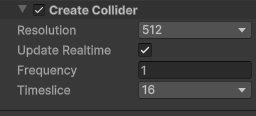
GPU-CPU Synchronization and Performance
Since the fluid is simulated entirely on the GPU, the height data required for a physics collider must be transferred back to the CPU to generate the surface. This GPU-readback and the subsequent collider generation are inherently expensive operations.
To prevent the application from experiencing large stalls, the update process is managed by the SurfaceCollider class. It operates asynchronously and uses timeslicing to spread the computational load across multiple frames. The system provides a critical trade-off:
- Increasing the number of timesliced frames reduces the per-frame cost.
- However, this also increases the update delay, meaning the physics surface lags further behind the current fluid state.
The system includes several settings to modify both the quality of the generated collider and the performance characteristics of this synchronization process.
Collider Properties
Encapsulates settings used for configuring and initializing Surface Collider.
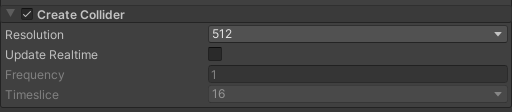
| Property | Description |
|---|---|
| Create Collider | Toggles the generation of a Terrain Collider to handle physical interactions with the fluid surface. |
| Resolution | Specifies the grid resolution of the generated Terrain Collider. This value determines the density of the physics mesh. Higher resolutions result in more accurate physical interactions but increase generation time and physics processing overhead. Internally, the actual grid size is set to resolution + 1 to satisfy heightmap requirements. |
| Realtime | Controls whether the collider’s heightmap is updated at runtime to match the visual fluid simulation. When enabled, the simulation data is continuously synchronized with the physics collider. Note that this process requires reading GPU terrain data back to the CPU and applying it to the Terrain Data, which can be resource-intensive and cause garbage collection spikes. |
| Update Frequency | The interval, in frames, between consecutive collider updates when Realtime is enabled. Increasing this value reduces the performance cost of the readback but causes the physics representation to lag behind the visual rendering. |
| Timeslicing | The number of frames over which a single full collider update is distributed. This feature splits the heightmap update into smaller segments, processing only a fraction of the data per frame. This helps to smooth out performance spikes and maintain a stable framerate, though it increases the time required for the collider to fully reflect a change in the fluid surface. |