Fluid Shaders
Fluid Frenzy ships dedicated surface shaders for water, lava, and GPU particles. Assign them to the materials used by Water Surface, Lava Surface, and Fluid Particle System components.
All water surface shaders sample the same Fluid Simulation data (height, velocity, foam, flow) and work with Water Surface features such as underwater effects, caustics, planar reflections, and screen-space reflections.
Water Shader
The FluidFrenzy/Water shader is applied to the material used by the Water Surface component. It provides a comprehensive set of material properties for creating visually appealing water.
Compatibility: This shader is compatible with both the Universal Render Pipeline (URP) and the Built-in Render Pipeline (BiRP).
Note: The High Definition Render Pipeline (HDRP) requires a separate, dedicated shader: FluidFrenzy/HDRP/Water.
Lighting
Properties controlling the illumination and shading effects.
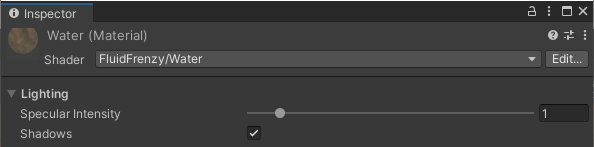
| Property | Description |
|---|---|
| Specular Intensity | Scales the brightness of specular highlights from the main directional light. |
| Sun Roughness | Controls the roughness of direct specular highlights from lights (lower = sharper highlight, higher = broader highlight). |
| Shadows | Enables or disables whether the water surface receives shadows. |
Reflection
Properties controlling the water surface’s reflection of the environment.

| Property | Description |
|---|---|
| Reflection Roughness | Controls how blurry reflection probes (and HDRP smoothness) appear (lower = sharper reflections, higher = blurrier reflections). |
| Planar Reflection | Enables or disables the use of planar reflections instead of only reflection probes. |
| Surface Reflections | Selects how the water surface reflects the environment: reflection probes only, planar camera reflections, or screen-space ray marched reflections (BiRP / URP). |
| Reflectivity Offset | Offsets the base reflectiveness of the water surface. Use this to ensure the water is reflective even at sharp viewing angles. |
| Distortion | Scales the distortion applied to planar reflections. |
Absorption
Properties controlling depth-based color, transparency, and refraction effects.

| Property | Description |
|---|---|
| Color | RGB sets the color of the water at maximum depth. Alpha (A) is the base transparency of the water. If ‘Refraction Mode’ is ‘Screenspace Absorb’, RGB is a color multiplier where White (1.0) is fully transparent. For ‘Alpha’ or ‘Screenspace Tint’, RGB is the final color tint the water reaches at maximum depth/opacity. |
| Depth Transparency | Scales the rate at which the water’s color changes and transparency fades based on depth. Lower values make the water more transparent at a faster rate. |
| Refraction Mode | Selects the method for rendering water transparency and refraction: - Alpha: Simple alpha blending transparency. - Opaque: Water is rendered as a solid, non-transparent surface. - Screenspace Tint: Uses screen-space refraction (GrabPass). Color interpolates from clear to the set color based on depth. Use for a single water color tint. - Screenspace Absorb: Uses screen-space refraction (GrabPass). Scene color is multiplied by water color, allowing for a color gradient (e.g., clear to turquoise to blue). |
| Distortion | Scales the amount of distortion applied to the screenspace refraction effect (‘Screenspace Tint’ or ‘Screenspace Absorb’ modes). |
Subsurface Scattering
Properties controlling the diffusion of light and subsurface scattering effect beneath the water surface.
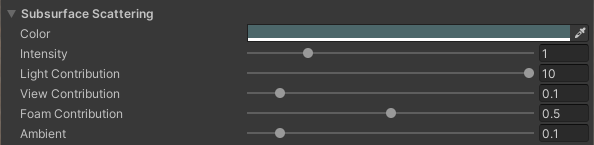
| Property | Description |
|---|---|
| Color | The tint of light scattered inside the water, like underwater fog or sun through shallow waves. |
| Intensity | Master multiplier on all scatter terms below. |
| Ambient Scattering | Constant glow from ambient light across the whole surface. Needs baked GI to show on BiRP. |
| Height Scattering | Adds ambient glow on wave crests where the water is raised. |
| Displacement Scattering | Adds ambient glow where the surface is choppy or horizontally displaced. |
| Scattering Wave Height | Typical wave height used to scale Height and Displacement scattering. Lower values make those sliders more sensitive. |
| Body Scattering | How much the sun glows through flat areas and wave troughs. |
| Tip Scattering | How much the sun glows through wave crests. Usually the most visible of the two. |
| Foam Contribution | Scales the subsurface scattering contribution in areas covered by foam. |
Waves
Properties for adding detail to the water surface using normal mapping and procedural vertex displacement.
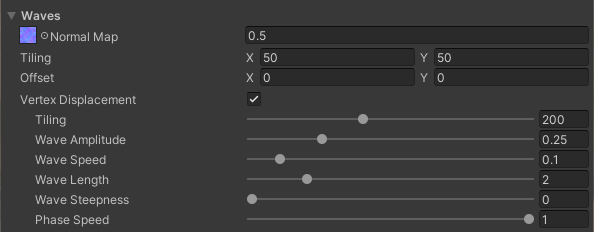
| Property | Description |
|---|---|
| Normal Map | Texture used to add fine detail to the water’s normals for lighting and PBR shading. |
| Velocity Influence | Min = Strength at resting water. Max = Max strength multiplier at high velocity. |
Foam
Properties controlling the appearance and masking of the foam effect.
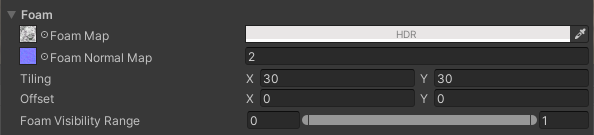
| Property | Description |
|---|---|
| Foam Color | Sets the Foam Color (RGB) and acts as a multiplier/mask (A) for the Foam Map’s transparency. |
| Foam Map | Texture used for the foam’s diffuse color (RGB) and its base mask/transparency (A). |
| Foam Normal Map | Normal map texture used to add PBR lighting detail to the foam. |
| Foam Visibility Range | Sets the minimum and maximum threshold values for when the foam becomes visible and reaches its maximum strength. Foam visibility is interpolated between these values using a smoothstep function. |
| Screenspace Particles | Enables the use of the screenspace particles (from the FluidParticles component) as an additional mask to generate foam. |
| Foam Mode | Selects the blending method for the foam: • Albedo: Soft foam using the Foam Map for color and mask. • Clip: Hard-edged foam using the Foam Map’s red channel as a clip value for sharp borders. • Mask: Uses the Foam Layer Mask’s value to select one of the Foam Map’s RGB channels as an extra mask for blending the foam color, allowing for varied intensity: 0-0.334 uses Blue, 0.334-0.667 uses Green, and 0.667-1 uses Red. |
| Foam Smoothness | Controls how glossy the foam appears. Lower values produce matte, chalky whitecaps. |
| Water Specular Suppress | Lowers water smoothness (sun spec + reflections) on visible foam. 1 = matte foam smoothness, 0 = no change. |
| Foam Ambient Floor | Minimum brightness for foam in shadowed areas. |
Rendering
General rendering, depth-handling, and simulation sampling properties.

| Property | Description |
|---|---|
| Layer | Selects which layer (e.g., Water or Lava, etc.) from the Fluid Simulation field to sample for effects. |
| Fade Height | The world height at which the water will be fully faded out. Used to soften edges or blend with geometry above a certain height. |
| Linear Clip Offset | A linear offset applied to the clip-space Z depth to help prevent visual clipping (Z-fighting) with close terrain or surfaces. |
| Exponential Clip Offset | An exponential/depth-based offset applied to the clip-space Z depth to help prevent visual clipping (Z-fighting) with distant terrain or surfaces. |
| UV Space | Controls which coordinate space is used for sampling Wave Normal / Foam / Detail Waves. - Normalized UV Space: uses simulation UVs in 0..1. - World UV Space: uses world XZ planar UVs. In this mode the texture tiling values are interpreted as repeats per meter (1,1 repeats every meter). |
| Non-Tiled Sampling | Hides texture tiling artifacts on the wave normal, detail waves and foam by sampling a noise key once and offsetting samples. Slight extra cost. |
Stylized Water Shader
The FluidFrenzy/StylizedWater shader is applied to the material used by the Water Surface component. It provides a stylized look driven by the fluid simulation.
Compatibility: This shader is compatible with both the Universal Render Pipeline (URP) and the Built-in Render Pipeline (BiRP).
Lighting
Properties controlling the illumination and shading effects.
| Property | Description |
|---|---|
| Specular | Scales water specular reflectance (F0). Brightness of GGX highlights from the main light. |
| Specular Roughness | Perceptual roughness of the specular lobe. 0 = tight sharp highlights, 1 = broad soft highlights. Uses stylized GGX (Unity Standard PBS). |
| Sparkle | Sun glitter from wave normals. Assign Wave Normals for best results. |
| Sparkle Size | Lower is tighter; higher is larger glints. |
| Flow Tint | Soft color streaks following simulation velocity. |
| Shadows | Enables or disables whether the water surface receives shadows. |
Reflection
Properties controlling the water surface’s reflection of the environment.
| Property | Description |
|---|---|
| Strength | Scales sky/probe reflections blended by Fresnel. |
| Fresnel | Controls how strongly reflections increase at grazing angles. |
| Reflectivity Offset | Offsets the base reflectiveness of the water surface. Use this to ensure the water is reflective even at sharp viewing angles. |
| Reflection Roughness | Controls how blurry reflection probes appear (lower = sharper, higher = blurrier). |
| Planar Reflection | Enables or disables the use of planar reflections instead of only reflection probes. |
| Surface Reflections | Reflection probes only, planar camera reflections, or screen-space reflections (BiRP / URP). |
| Distortion | Scales the distortion applied to planar reflections. |
Absorption
Properties controlling depth-based color, transparency, and refraction effects.
| Property | Description |
|---|---|
| Shallow Color | Water color near the shore / shallow scene depth. |
| Deep Color | Water color at greater scene depth. |
| Horizon Color | Tint at grazing view angles. |
| Horizon Strength | How strongly horizon color is applied. |
| Horizon Power | Higher concentrates horizon tint toward the silhouette. |
| Depth Scale | Scene depth used for shallow/deep color. Higher stays shallow farther from shore. |
| Opacity | Base transparency / absorption strength of the water. |
| Depth Transparency | Scales how quickly opacity/absorption builds with underwater path depth. |
| Refraction Mode | Selects the method for rendering water transparency and refraction: - Alpha: Simple alpha blending transparency. - Opaque: Water is rendered as a solid, non-transparent surface. - Screenspace Tint: Uses screen-space refraction. Color interpolates from clear to the set color based on depth. - Screenspace Absorb: Uses screen-space refraction. Scene color is multiplied by water color. |
| Distortion | Scales the amount of distortion applied to screenspace refraction. |
Waves
Properties for adding detail to the water surface using normal mapping.
| Property | Description |
|---|---|
| Normal Map | Optional scrolling/flowing normal map. Detail-wave normals come from the Displacement Waves effect when enabled. |
| Velocity Influence | Min = Strength at resting water. Max = Max strength multiplier at high velocity. |
Foam
Properties controlling the appearance and masking of the foam effect.
| Property | Description |
|---|---|
| Foam Color | RGB = foam tint. Alpha = clip cutoff for Foam Map. |
| Foam Map | Flow-mapped foam pattern. Red channel is clipped against Foam Color alpha for sim foam and edge foam. |
| Amount | Scales the simulation foam mask that opens the clip. |
| Foam Visibility Range | Sets the minimum and maximum threshold values for when the foam becomes visible and reaches its maximum strength. |
| Edge Foam | Intersection foam width from scene depth. |
| Edge Texture | How much Foam Map breaks up the shore rim (0 solid, 1 full clip). |
Rendering
General rendering, depth-handling, and simulation sampling properties.
| Property | Description |
|---|---|
| UV Space | Controls which coordinate space is used for sampling Wave Normal / Foam / Detail Waves. - Normalized UV Space: uses simulation UVs in 0..1. - World UV Space: uses world XZ planar UVs. In this mode the texture tiling values are interpreted as repeats per meter. |
| Layer | Selects which layer from the Fluid Simulation field to sample for effects. |
| Fade Height | The height at which the water will be fully faded out. Used to soften edges or blend with geometry. |
| Linear Clip Offset | A linear offset applied to the clip-space Z depth to help prevent visual clipping (Z-fighting) with close terrain or surfaces. |
| Exponential Clip Offset | An exponential/depth-based offset applied to the clip-space Z depth to help prevent visual clipping (Z-fighting) with distant terrain or surfaces. |
| Non-Tiled Sampling | Hides texture tiling artifacts on the wave normal, detail waves and foam by sampling a noise key once and offsetting samples. Slight extra cost. |
| Cull Mode | Which faces are culled when rendering the water surface. |
Toon Water Shader
The FluidFrenzy/ToonWater shader is applied to the material used by the Water Surface component. It provides a cartoon/cel-shaded look driven by the fluid simulation.
Compatibility: This shader is compatible with both the Universal Render Pipeline (URP) and the Built-in Render Pipeline (BiRP).
Lighting
Cartoon shading, sun highlights, glitter, and whether the water receives shadows.
| Property | Description |
|---|---|
| Lighting Ramp | Optional greyscale strip that sets the light and shadow steps. Use Point filter and hard bands for a cartoon look. Leave white to use the built-in steps. |
| Specular | Brightness of the hard sun highlight on the water. |
| Specular Roughness | How large the sun highlight disc is. 0 = tight spot, 1 = wider disc. Still a hard cel edge (unlike Stylized GGX, which softens with roughness). |
| Sparkle | Tiny bright glints from the waves catching the sun. |
| Sparkle Size | How large those glints are. Lower is tighter; higher is bigger. |
| Shadows | Whether the water surface receives shadows from other objects. |
Reflection
How much of the sky and surroundings the water reflects.
| Property | Description |
|---|---|
| Strength | Overall strength of environment reflections on the water. |
| Fresnel | How much stronger reflections get when you look across the water at a shallow angle. |
| Reflectivity Offset | Minimum reflection amount, even when looking straight down. |
| Reflection Roughness | How sharp or blurry the reflected sky looks. Lower is sharper; higher is softer. |
| Planar Reflection | Use a live mirrored reflection of the scene instead of only sky/probes. |
| Surface Reflections | Reflection probes only, planar camera reflections, or screen-space reflections (BiRP / URP). |
| Distortion | How much waves warp the planar reflection. |
Absorption
Water color by depth, how clear it is, and how the bottom shows through.
| Property | Description |
|---|---|
| Shallow Color | Water color near the shore or in shallow areas. |
| Deep Color | Water color in deeper areas. |
| Horizon Color | Extra tint when looking across the water toward the horizon. |
| Horizon Strength | How strong that horizon tint is. |
| Horizon Power | Higher keeps the horizon tint closer to the far edge of the view. |
| Depth Scale | How quickly color shifts from shallow to deep. Higher keeps the shallow color farther from shore. |
| Opacity | How solid the water looks. Higher hides more of the bottom. |
| Depth Transparency | How quickly the water becomes opaque as you look through more of it. |
| Refraction Mode | How the water shows the scene underneath: - Alpha: Simple see-through blending. - Opaque: Solid water with no see-through. - Screenspace Tint: Distorts the scene and fades toward your water colors with depth. - Screenspace Absorb: Distorts the scene and darkens/tints it with depth. |
| Distortion | How much the water bends the view of the scene underneath. |
Rim
Soft edge tint when looking across the water surface.
| Property | Description |
|---|---|
| Rim Color | Color of the soft edge tint at glancing view angles. |
| Rim Power | Higher keeps that soft edge tint closer to the silhouette. |
| Rim Strength | How strong the soft edge tint is. |
Waves
Properties for adding detail to the water surface using normal mapping.
| Property | Description |
|---|---|
| Normal Map | Optional scrolling/flowing normal map. Detail-wave normals come from the Displacement Waves effect when enabled. |
| Velocity Influence | Min = Strength at resting water. Max = Max strength multiplier at high velocity. |
Foam
Properties controlling the appearance and masking of the foam effect.
| Property | Description |
|---|---|
| Foam Color | Foam tint. Alpha controls how much of the Foam Map shows through. |
| Foam Map | Pattern used for foam on the surface and along the shore. |
| Amount | How much foam from the simulation appears on the surface. |
| Foam Visibility Range | Where foam starts to appear and where it reaches full strength. |
| Edge Foam | How wide the foam ring is along the shore. |
| Edge Texture | How much the Foam Map breaks up the shore foam. 0 is a solid ring; 1 uses the full pattern. |
Rendering
General rendering, depth-handling, and simulation sampling properties.
| Property | Description |
|---|---|
| UV Space | Controls which coordinate space is used for sampling Wave Normal / Foam / Detail Waves. - Normalized UV Space: uses simulation UVs in 0..1. - World UV Space: uses world XZ planar UVs. |
| Layer | Selects which layer from the Fluid Simulation field to sample for effects. |
| Fade Height | The height at which the water will be fully faded out. |
| Linear Clip Offset | Linear clip-space Z offset to reduce Z-fighting with close surfaces. |
| Exponential Clip Offset | Depth-based clip-space Z offset for distant surfaces. |
| Non-Tiled Sampling | Hides texture tiling artifacts on wave normal, detail waves and foam. |
| Cull Mode | Which faces are culled when rendering the water surface. |
Lava Shader
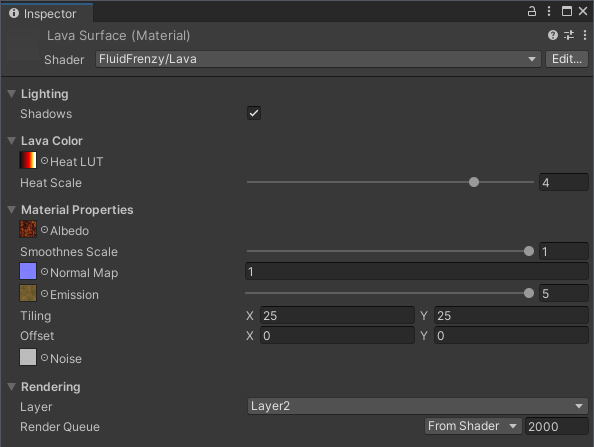
The FluidFrenzy/Lava shader is applied to the material used by the Lava Surface component. It creates realistic, flowing lava visuals where the ‘heat’ and resulting glow are dynamically driven by the length of the fluid’s velocity vector in the simulation.
The shader uses textures for the base ‘cold’ lava surface (Albedo, Smoothness, Normal Map) and employs a specialized Heat Look-Up Table (LUT) alongside an Emission Map to control the vibrant colors and intensity of the glowing, ‘hot’ lava. A separate Noise texture is used to break up tiling patterns.
Compatibility: The FluidFrenzy/Lava shader is for URP and BiRP. The High Definition Render Pipeline (HDRP) requires a separate, dedicated shader: FluidFrenzy/HDRP/Lava.
Lighting
Properties controlling the illumination and shading effects.
| Property | Description |
|---|---|
| Light Intensity | Scales the influence of the main directional light on the lava surface (e.g., specular highlights). |
| Shadows | Enables or disables if the lava surface receives shadows from other scene objects. |
Heat & Emission
Properties controlling the lava’s color and emission, driven by the fluid’s ‘heat’ (usually fluid velocity/movement).
| Property | Description |
|---|---|
| Heat LUT | Color ramp for flowing molten lava. Sampled from how fast the lava is moving. |
| Heat Scale | How quickly movement pushes the look through the Heat LUT. Higher reaches the hot end sooner. |
| Emission Map | Texture used for the emission color of the lava. A sample of this texture is multiplied by the fluid’s ‘heat’. |
| Emission | Scales the overall intensity of the emission determined by the Heat LUT and the Emission Map. |
Material Properties
Properties controlling the cold lava surface’s visual and PBR shading characteristics.
| Property | Description |
|---|---|
| Albedo | Color of the cooled lava crust (RGB). Smoothness is read from the alpha channel. |
| Smoothness Scale | Scales the PBR smoothness of the cold lava surface, affecting its specular reflections. |
| Normal Map | Normal map texture used to add detailed lighting to the cold lava surface. |
Rendering
General rendering, depth-handling, and simulation sampling properties.
| Property | Description |
|---|---|
| Cull Mode | Which triangle faces to discard: Back (default, typical opaque surface), Front (invert), or Off (double-sided; both faces render and lighting uses the correct face normal). |
| Layer | Selects which layer (e.g., Water or Lava, etc.) from the Fluid Simulation field to sample for effects. |
| Fade Height | The world height at which the lava will be fully faded out. Used to soften edges or blend with geometry above a certain height. |
| Linear Clip Offset | A linear offset applied to the clip-space Z depth to help prevent visual clipping (Z-fighting) with close terrain or surfaces. |
| Exponential Clip Offset | An exponential/depth-based offset applied to the clip-space Z depth to help prevent visual clipping (Z-fighting) with distant terrain or surfaces. |
| Non-Tiled Sampling | Hides texture tiling artifacts on the lava albedo, normal and emission by sampling a noise key once and offsetting samples. Slight extra cost. |
Particle Shaders
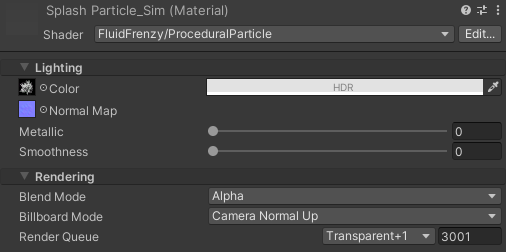
Fluid Frenzy uses custom shaders to render its completely GPU-accelerated particle system. Two shaders are available: ProceduralParticle (Lit) and ProceduralParticleUnlit. Both render particles as billboards.
- ProceduralParticle (Lit): Includes PBR lighting with support for Normal Maps, Metallic, and Smoothness.
- ProceduralParticleUnlit (Unlit): Does not perform lighting, offering a lower rendering cost.
- FluidParticleSplash
All shaders share settings for Blend Mode and Billboard Mode. Billboard Mode controls particle orientation, including options for camera-facing or world-up normals to manage lighting.
Compatibility: The High Definition Render Pipeline (HDRP) requires its own dedicated shaders: FluidFrenzy/HDRP/ProceduralParticle and FluidFrenzy/HDRP/ProceduralParticleUnlit.
Procedural Particle (Lit) Properties
| Property | Description |
|---|---|
| Albedo | albedo color and transparency of the particle. |
| Color | albedo color and transparency of the particle. |
| Normal Map | can be used to add extra lighting details. |
| Alpha Threshold | Alpha below this value will be clipped. |
| Fade Submerged | Fades particles that fall below the fluid surface. |
| Blend Mode | select which to use for the particles. |
| Source Blend | Source Blend. |
| Dest Blend | Dest Blend. |
| ZWrite | Write particle to the depth buffer. |
| Billboard Mode | Select which method to use for rendering the particle billboard. � Camera: the billboard and world normal will face in the direction of the camera. � Camera Normal Up: the billboard will face the camera and the normal will face in in the world space up direction.This can be useful to have more uniform lighting from every direction. � Up: the billboard and normal will both face in the world space up direction. � Normal: not yet implemented. |
| Smoothness | The smoothness of this material. |
| Metallic | The metalness of this material. |
Procedural Particle (Unlit) Properties
| Property | Description |
|---|---|
| Albedo | albedo color and transparency of the particle. |
| Color | albedo color and transparency of the particle. |
| Alpha Threshold | Pixels with transparency below this value are discarded. Higher values increase performance but can make edges look jagged. |
| Fade Submerged | Automatically fades out particles that fall beneath the surface level of the simulated fluid grid. |
| Blend Mode | The mathematical blending operation used to draw the particle onto the screen. |
| Source Blend | The source blend factor used for custom blend modes. |
| Dest Blend | The destination blend factor used for custom blend modes. |
| ZWrite | Whether the particle writes its depth to the Z-Buffer. Usually left off for transparent fluids. |
| Billboard Mode | Controls how the particle faces the camera. ‘Camera Normal Up’ is recommended for proper directional lighting. |
Procedural Particle Splash Properties
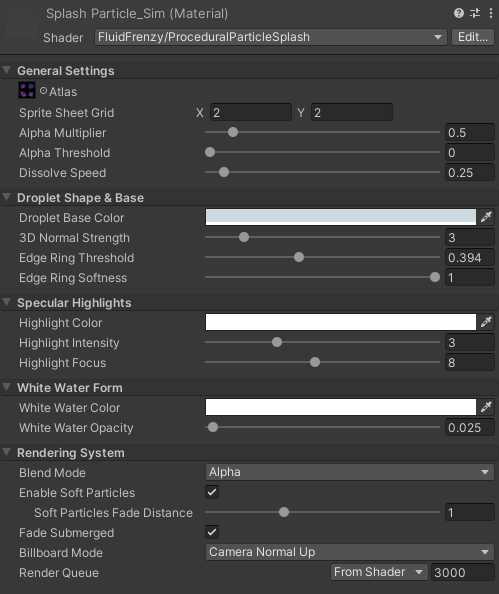
Custom fluid rendering shader for water splashes.
| Property | Description |
|---|---|
| Atlas | Atlas texture driving the fluid shapes. R = Droplets, G = Specular Highlights, B = Aerated Foam, A = Dissolve Noise. |
| Sprite Sheet Grid | The number of columns (X) and rows (Y) in the atlas. The shader will randomly assign a static frame to each particle at birth. |
| Alpha Multiplier | Globally scales the overall opacity of the particles. Higher values make the fluid look thicker and more opaque. |
| Alpha Threshold | Pixels with transparency below this value are discarded. Higher values increase performance but can make edges look jagged. |
| Droplet Base Color | The baseline ambient color of the water droplets. |
| 3D Normal Strength | Generates physical volume shading by calculating slopes from the Red channel. |
| Edge Ring Threshold | Controls the internal thickness of the droplet. Lower values make the center thicker. |
| Edge Ring Softness | Controls the blurriness of the droplet’s outer edge. Higher values create a softer look. |
| Highlight Color | The specular color of the light reflecting off the droplets. |
| Highlight Intensity | How bright the specular highlights glow when hit by directional light. Higher values create a glaring, highly reflective surface. |
| Highlight Focus | Controls the size and sharpness of the highlights. Higher values tighten the light into tiny, sharp pinpricks. |
| White Water Color | The color of the internal aeration and foam (driven by the Blue channel). |
| White Water Opacity | How strongly the foam channel blends into the droplet. Higher values fill the droplet, simulating thick, churning white water. |
| Dissolve Speed | How fast the particle physically erodes over its lifetime. A value of 1.2 will fully dissolve the particle exactly as it dies. |
| Enable Soft Particles | Smoothly fades the particle alpha where it intersects with scene geometry to prevent harsh clipping lines. |
| Soft Particles Fade Distance | The physical distance over which the intersection fade occurs. Higher values create a longer, softer fade against walls and floors. |
| Fade Submerged | Automatically fades out particles that fall beneath the surface level of the simulated fluid grid. |
| Blend Mode | The mathematical blending operation used to draw the particle onto the screen. |
| Source Blend | The source blend factor used for custom blend modes. |
| Dest Blend | The destination blend factor used for custom blend modes. |
| ZWrite | Whether the particle writes its depth to the Z-Buffer. Usually left off for transparent fluids. |
| Billboard Mode | Controls how the particle faces the camera. ‘Camera Normal Up’ is recommended for proper directional lighting. |
Fluid Decal Shader
Materials for Fluid Decal Renderer use FluidFrenzy/FluidDecal (unlit) or FluidFrenzy/FluidDecalLit (PBR). HDRP projects use Shader Graph variants under FluidFrenzy/HDRP/Decal.
Material Properties
Decal color, textures, and lit surface response. Tiling and offset apply to the decal texture and follow the same UVs as normal and mask maps on FluidDecalLit.
| Property | Description |
|---|---|
| Decal Texture | RGBA albedo sampled on the fluid surface. Alpha controls transparency. |
| Tint | HDR color multiplier applied to the decal texture. |
| Normal Map | Tangent-space normal map blended with the fluid surface normal. Uses the same UVs and flow mapping as the decal texture. |
| Normal Strength | Scales the normal map before blending with the fluid surface. |
| Mask Map | Optional packed map. Green = occlusion, blue = height (parallax, needs contrast), alpha = smoothness. Uses the same UVs and flow mapping as the decal texture. |
| Occlusion Strength | Blends the green occlusion channel from the mask map. |
| Metallic | PBR metallic value for FluidDecalLit. |
| Smoothness | PBR smoothness multiplier. When a mask map is assigned, smoothness comes from the alpha channel. |
Parallax
Optional parallax occlusion mapping from the mask map blue channel.
| Property | Description |
|---|---|
| Enable Parallax | Uses the blue height channel in the mask map. Adds extra texture samples; off by default. |
| Height Scale | Parallax height scale in texture UV units. Positive: mask blue = raised. Negative inverts the height map. |
Rendering
Transparent queue and draw order for the decal pass. The shader defaults to Geometry+512 (render queue 2512) so decals sort after opaque geometry and can be ordered relative to the water surface. Use the material Render Queue field to adjust layering when multiple transparents overlap.