Using ShaderGraph
Create your own shaders using ShaderGraph and the Fluid Frenzy ShaderGraph nodes. You can create custom shaders for the Fluid Simulation, Terraform Terrain, and Procedural particles. To get started it is recommended to look at the example shader found at FluidFrenzy\Runtime\Rendering\Shaders\ShaderGraph\SampleFluidSimple. This example demonstrates how to sample the fluid simulation’s data like the height, depth. velocity, layer, normals and how to apply flowmapping.
Fluid Simulation Nodes
| Node | Description |
|---|---|
| ApplyClipSpaceOffset | Applies a depth offset to the clipspace position |
| ClampVector2 | Clamps a Vector2 to a given length |
| ClipFluid | Calls hlsl clip to discard any invisible fluid layer’s pixels. |
| EvaluateWaterFoamMask | Evaluate the visibly of the foam based on factors like the selected mode, albedo, and foam mask. |
| FluidClipHeight | Shader subgraph for fluid clip height |
| FluidUV0To1 | Returns the 0 to 1 UV based of the FluidUV from the SampleSimulationData node. |
| FluidUVGrid | Returns the Grid UV based of the FluidUV from the SampleSimulationData node. This UV matches the Unity Terrain height sampling UV. |
| LayerToMask | Converts the layer data from the SampleSimulationData to a -1 to 1 mask. |
| SampleFoam | Samples the fluid simulation’s foam mask. |
| SampleWetness | Samples the residual Wetness Layer mask at a fluid UV. |
| SampleWetnessFromPositionWS | Samples the residual Wetness Layer mask at a world-space position. Uses the world wetness atlas when a Water World Renderer is active. |
| SampleHeightVelocity | Samples the fluid simulation’s height and velocity data. |
| SampleNormal | Samples the fluid simulation’s surface normal. |
| SampleSimulationData | Samples all the fluid simulation data at a provided UV coordinate. |
| SampleSimulationDataFromPositionOS | Samples all the fluid simulation data at a provided object space position. |
| SampleSimulationDataFromPositionWS | Samples all the fluid simulation data at a provided world space position. |
| SampleTerrain | Samples the terrain height used in the fluid simulation. |
| SampleTex2DFlow | Samples the provided texture using the selected flow mapping technique. |
| SampleTex2DFlowDynamic | Samples the provided texture using the dynamic flow mapping technique. |
| SampleTex2DFlowStatic | Samples the provided texture using the static flow mapping technique. |
| SampleVelocity | Samples the fluid simulation’s velocity data. |
| SampleVelocityFromPositionWS | Samples the fluid simulation’s velocity at a world-space position. |
| FluidCurrentDisplace | Vertex offset that leans a mesh or grass blade with the fluid current. Strength, stop depth, falloff, and sway control how far it bends. |
| UVToBorderMask | Convert the UV into a soft border fading to black on the edges. |
| UVToBorderMaskInverted | Convert the UV into a soft border fading to white on the edges. |
Terraform Terrain Nodes
| Node | Description |
|---|---|
| SampleHeightMap | Samples the Terraform Terrain Heightmap. |
| SampleLayers | Samples and blends all the layers of the Terraform Terrain shader based on the splatmap mask. |
Particle Nodes
| Node | Description |
|---|---|
| SampleParticleData | Samples the particle simulation’s graphics buffer to retrieve it’s data. |
| SampleParticleVertexData | Sample the vertex position’s of the particle. |
| TransformParticleToBillboard | Transform the particle and particle vertex data into a billboard. |
Current Displacement Shaders
These Shader Graph shaders bend grass and meshes with the Fluid Simulation current. Vertices lean from the object pivot (or grass tuft root) along the flow, with a small sway so the motion is not a straight sine wave. Displacement fades with water depth: fully bent near the surface, stopped at Stop Depth.
Use the ready-made graphs, or drop the FluidCurrentDisplace subgraph into your own Shader Graph.
Grass (FluidFrenzy/FluidCurrentGrassLit, FluidFrenzy/FluidCurrentGrassUnlit) is for terrain mesh details and painted tufts. Vertex color RGB tints the blade. Vertex color alpha scales how much that vertex leans (keep 0 at the root). Both Transform nodes on the subgraph must stay on Offset; Direction skips GPU-instance matrices and makes tufts sway the wrong way. Built-in terrain mesh details need the Unlit graph. The Lit graph is PBR on Built-in and URP.
Mesh (FluidFrenzy/FluidCurrentMeshLit, FluidFrenzy/FluidCurrentMeshUnlit) is for MeshRenderers such as seaweed. Keep both Transform nodes on Direction. Texture alpha drives cutout.
Example prefabs and materials live in FluidFrenzy\Runtime\Presets\Prefabs\Current and FluidFrenzy\Runtime\Presets\Materials\Current.
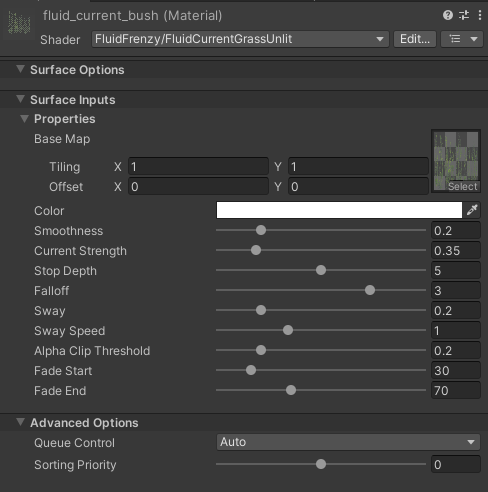
| Property | Description |
|---|---|
| Base Map | Albedo texture. Grass multiplies this by Color and vertex RGB. Mesh uses texture alpha for cutout. |
| Color | Tint multiplied with the base map. |
| Smoothness | Surface smoothness on the Lit graphs. Unlit ignores this. |
| Current Strength | How far vertices lean with the current. |
| Stop Depth | Water depth in meters where current displacement fades out. |
| Falloff | How quickly the lean fades as depth approaches Stop Depth. |
| Sway | Extra side-to-side meander on top of the current lean. |
| Sway Speed | How fast the sway animates. |
| Alpha Clip Threshold | Cutout threshold. Grass also dithers with camera distance. |
| Fade Start | Grass only. Distance where the blade starts to fade. |
| Fade End | Grass only. Distance where the blade is fully faded. |