Fluid Simulation
Terrain and Obstacle Input
Boundary Conditions
Side Border Settings
Domain
Solver
Initial Conditions
Terrain & Ground
Simulation Culling
Extension Layers
Create Collider
Fluid Simulation Settings
Creation
Properties
Second Layer
Flux Fluid Simulation
The Pipe (Flux) Model
Simulation Characteristics
Flux Fluid Simulation Settings
Creation
Specialized Flux Properties
Flow Fluid Simulation
The 2D Height Field Model
Performance and Stability
Solver
Ocean FFT Coupling
Flow Fluid Simulation Settings
Creation
Specialized Flow Properties
Fluid Simulation Static
Fluid Surface Bake
Foam Layer
Foam Layer Settings
Foam Render Settings
Foam Decay Settings
Foam Pressure Settings
Foam Wave Settings
Shallow Foam Settings
Turbulence Foam Settings
Wetness Layer
Wetness Layer Settings
Rendering Settings
Decay Settings
Fluid Flow Mapping
Fluid Flow Mapping Settings
Erosion Layer
Multi-Layer Terrain System
Terrain Modification Processes
Erosion Settings
Terraform Layer
Liquefaction (Solid Terrain to Fluid)
Fluid Contact Reactions (Fluid and Terrain)
Fluid Mixing (Fluid + Fluid to Solid Terrain)
Fluid Contact Reaction
Terraform Settings
Terrain Modifier
Terrain Modifier Settings
Sediment Modifier
Sediment Modifier Settings
Terraform Modifier
Fluid Particle Generator
Splash Particles
Surface Particles
Fluid Particle System
Fluid RigidBody
Prerequisite
Fluid Density Calibration
Interaction Calculation
Fluid Displacement Profile
Fluid Interaction Profile
Fluid RigidBody Lite
Fluid Floater
Fluid Simulation Obstacle
Settings
Fluid Event Trigger
Fluid Ripple Zone (Beta)
Fluid Ripple Impulse (Beta)
Fluid Renderer
Fluid World Renderer
Fluid Renderer vs Fluid World Renderer
Setting up a tiled world
Which simulations are included
General
Mesh Rendering
Water World Renderer
Ocean FFT Settings
Surface Renderer
Render Properties
Detail Wave Effect
Detail Wave Settings
HDRP Water Surface Properties
Water Rendering
Water Surface
Underwater Effect
Underwater Settings
Current Particles
Current Particle Settings
Wet Lens Effect
Wet Lens Settings
Caustics Effect
Caustics Settings
Surface Reflections
Fluid Decal Renderer
Lava
Lava Surface
Under Lava Effect
Shadows
HDRP Water System
Fluid Simulation Manager
Simulation control
Multiplayer hooks (Beta)
Adding fluid
Adding sediment
Applying flow and forces
Sampling the simulation
Per-simulation brushes
Creating simulations, modifiers, and obstacles
Simulations
Surfaces
In-memory settings
Extension layers
Terraform terrain and simulation
Editor presets
Fluid modifiers
Terrain and terraform brushes
Obstacles
Installation
Package Manager
- Open your Unity Project
- Open the
Package Manager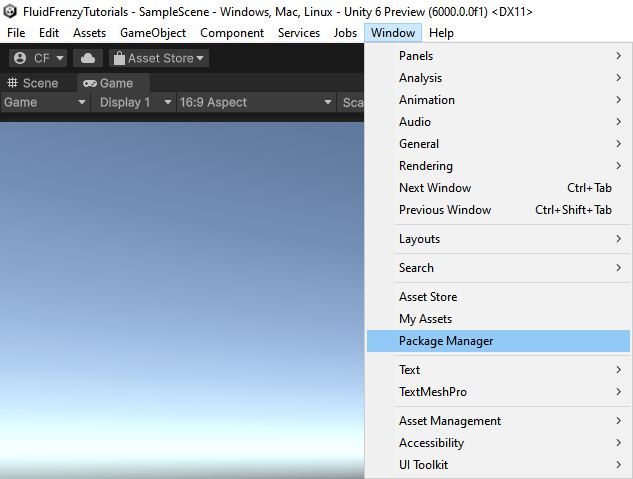
- In the Package Manager select
My Assets - Select the
Fluid Frenzypackage. - Click the
Downloadbutton in the top right.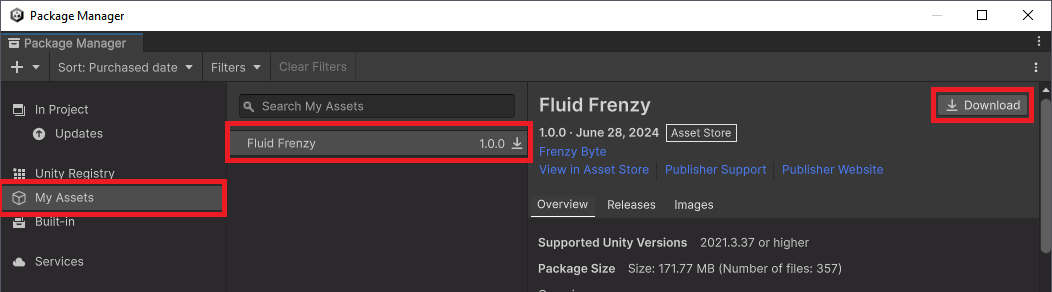
- After the download has finished click the
Import #VERSION to projectbutton. - This will open the Import Unity Package window. Click Import.
- The core package should now be imported. The samples are not automatically imported to reduce the package bloating your project. If you want to import the sample scenes please follow the steps here.
Unity Package File
If you have previously downloaded the package you can add the project by importing the Fluid Frenzy.unitypackage manually.
- Add the package through Assets > Import Package > Custom Package.
- Select the .unitypackage file for Fluid Frenzy. The previously downloaded package is generally stored in:
- windows:
C:\Users\USERNAME\AppData\Roaming\Unity\Asset Store-5.x\Frenzy Byte\Shaderswhere USERNAME windows account user name. - macos:
~/Library/Unity/Asset Store-5.x/Frenzy Byte/Shaders - linux:
~/.local/share/unity3d/Asset Store-5.x/Frenzy Byte/Shaders
- windows:
- This will add the package to the
Package Manager. - The core package should now be imported. If you want to import the sample scenes please follow the steps here.